

All blog posts
Welcome to GameSnag Blog — your ultimate hub for everything gaming. We help gamers compare game prices, discover the latest deals, read honest reviews, and stay updated with fresh gaming news, guides, and tips — all in one place. Whether you play on PC, PlayStation, Xbox, or mobile, GameSnag gives you real insights, verified deals, and pro advice so you can play smarter and save more. Join the GameSnag community and explore the world of gaming from a new angle — trusted, transparent, and built by gamers for gamers.
BlueStacks vs Other Emulators: Which Is Best for Gaming in 2026?
November 20, 2025 | by kabilan

After 5 Years in Teyvat: How Veteran Genshin Impact Players Really Feel in 2025
November 18, 2025 | by kabilan
Gaming Without Burnout: Healthy Habits for Long Sessions
November 10, 2025 | by kabilan

Why Game Prices Fluctuate So Fast – Behind the Digital Store Algorithm
November 5, 2025 | by kabilan


Why Some ‘Average’ Games Feel More Enjoyable Than AAA Titles
October 31, 2025 | by kabilan

Compare Game Price: How to Find the Best Deals and Save More on Every Game
October 29, 2025 | by kabilan

Mobile gaming on PC has become a huge trend. Whether you enjoy battle royale games, gacha titles, or strategy games, using an Android emulator gives you better performance, a bigger screen, keyboard+mouse controls, and long gameplay sessions without worrying about battery drain.
But with so many emulators available—BlueStacks, LDPlayer, MEmu, Nox, Gameloop, PrimeOS, MuMu—the big question remains:
Which emulator is actually the BEST for gaming in 2026?
In this guide, we break it down with real-world performance, features, game support, safety, and overall usability. No confusing tech jargon—just a clear, friendly, human-focused comparison.
Let’s get started.
⭐ Why the Emulator You Choose Matters
Not all emulators are built the same. Some are optimized for specific games like COD Mobile or Free Fire, while others focus on speed, stability, or low-end PC performance.
A good emulator can:
- Reduce lag
- Improve FPS
- Give better controls
- Prevent crashes
- Reduce CPU/GPU load
- Enhance overall gaming experience
A bad one can do the opposite.
1. BlueStacks – The Most Popular Emulator for Gaming
BlueStacks has been around since 2011, and in 2026, it still remains the most widely used Android emulator.
⭐ Why Gamers Prefer BlueStacks
- Excellent performance even on mid-range PCs
- Best keyboard + mouse mapping
- Support for multiple Android versions (Android 9, 11, and 13 options)
- Huge compatibility with games
- Regular updates
- Secure and trusted
🔥 Performance
BlueStacks 5 and the newer BlueStacks X come with improved:
- FPS stability
- Low RAM usage
- Multi-instance performance
- GPU rendering
It handles heavy titles like BGMI, Free Fire, COD Mobile, Genshin Impact, and Honkai Star Rail smoothly.
🎮 Best For:
- Gamers who play competitive shooters
- RPG and gacha games
- Multiple-instance farming
- Streamers and YouTubers
2. LDPlayer – The Best Performance for Low-End PCs
LDPlayer has grown extremely fast, mainly because it focuses on performance and lightweight design.
⭐ Why Gamers Choose LDPlayer
- Lightweight emulator
- Very smooth for low-end or older PCs
- Easy to configure
- Good FPS stability
🔥 Performance
LDPlayer often gives higher FPS on older CPUs and limited RAM systems. Their keymapping system is decent, but not better than BlueStacks.
🎮 Best For:
- Gamers with low-end PCs
- Casual players
- Farming games and MMOs
3. GameLoop – Official Emulator for CODM & Tencent Games
GameLoop is Tencent’s official emulator, originally built for PUBG Mobile. Today, it supports:
- PUBG Mobile
- Call of Duty Mobile
- Arena Breakout
- Free Fire MAX
- Various Tencent titles
⭐ Strengths
- Best performance for CODM and PUBG
- Excellent aiming accuracy
- Low input delay
⚠ Weaknesses
- Limited app support (not for all games)
- Cluttered interface
- Slightly higher RAM usage
🎮 Best For:
- FPS players
- CODM fans
- PUBG lovers
4. MEmu Play – A Great All-Round Alternative
MEmu is stable and flexible. Not as polished as BlueStacks, but delivers very good performance.
⭐ Strengths
- Strong multi-instance
- Good for AFK games
- Customizable performance settings
🎮 Best For:
- Strategy games
- Farming
- Casual gameplay
5. NoxPlayer – Good but Feels Outdated
NoxPlayer used to be a top emulator, but recently it has fallen behind due to:
- Fewer updates
- Slower performance
- Higher RAM usage
Still, some players like its simple UI.
🎮 Best For:
- Older PCs
- Classic games
6. MuMu Emulator – Great for Gacha Games
MuMu (by NetEase) is becoming popular among gacha players.
⭐ Strengths
- Very stable for RPGs
- Good FPS
- Low CPU usage
🎮 Best For:
- Genshin Impact
- Honkai Star Rail
- Cookie Run Kingdom
- Other heavy RPGs
🔥 7. PrimeOS / Bliss OS – Not Emulators (Full Android on PC)
These are OS-level Android systems. Instead of running in Windows, they boot as a full operating system.
Pros
- Best raw performance
- No emulator overhead
- Very fast FPS
Cons
- Harder to install
- Not compatible with all systems
Best For
- Advanced gamers
- Dedicated systems
🧪 Head-to-Head Comparison (2026)
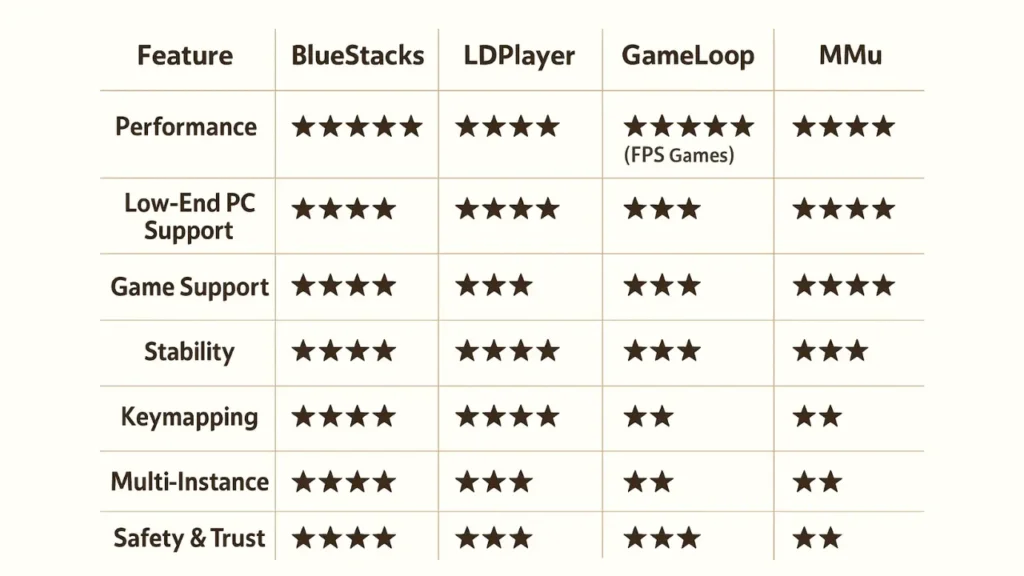
🏆 Which Emulator Is Best for Gaming in 2026? (Final Verdict)
1. Best Overall Gaming Emulator → BlueStacks
If you want the most stable, reliable, and compatible emulator for everyday gaming, BlueStacks wins easily.
⭐ Best FPS stability
⭐ Best for competitive games
⭐ Best multi-instance
⭐ Best compatibility
2. Best for Low-End PC → LDPlayer
If your PC has:
- Less than 8GB RAM
- No dedicated GPU
- Older CPU
Then LDPlayer is the better pick.
3. Best for Shooters → GameLoop
For games like:
- Call of Duty Mobile
- PUBG Mobile
- Arena Breakout
GameLoop performs the best.
4. Best for Gacha Games → MuMu / BlueStacks
Heavy RPGs run smoother on MuMu, but BlueStacks still leads in compatibility.
⭐ Conclusion
Choosing the best emulator depends on what type of gamer you are:
- Overall Best: BlueStacks
- Low-End PC: LDPlayer
- Best for CODM/PUBG: GameLoop
- Best for Multi-Instance: BlueStacks
- Best for Gacha: MuMu
If you want a powerful, trusted, and long-term emulator, BlueStacks remains the king in 2026.